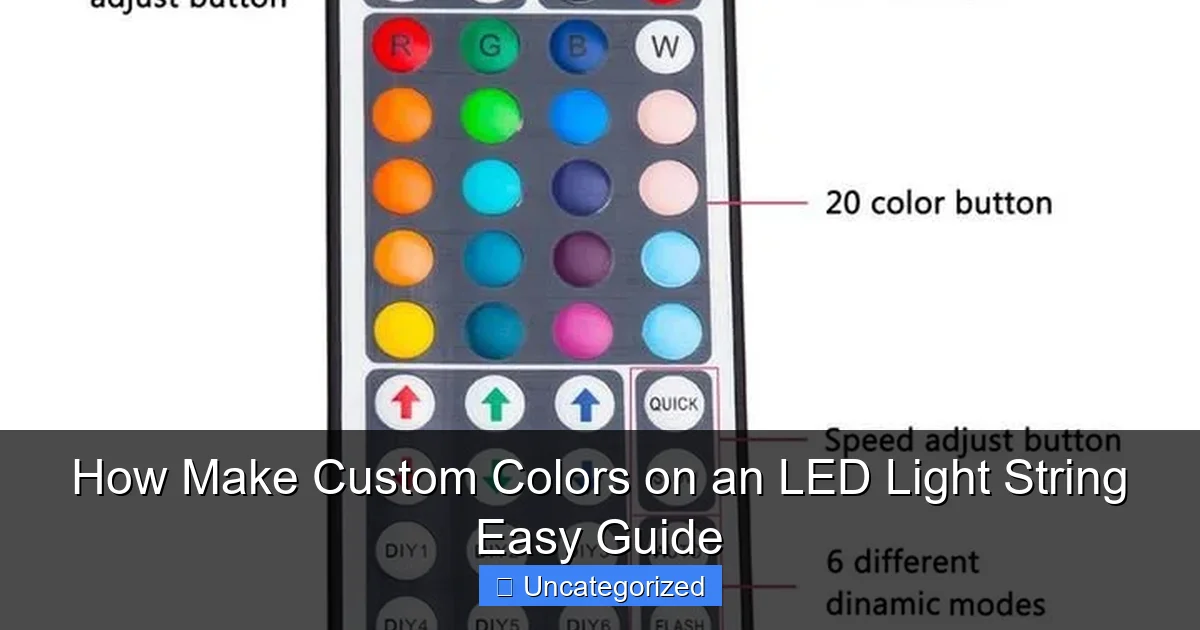
Featured image for how make custom colors on an led light string
Image source: i.pinimg.com
Creating custom colors on an LED light string is simple with RGB or addressable LEDs and a compatible controller or app. By adjusting individual red, green, and blue values—either manually or via smartphone—you can craft any color to match your mood or decor. No soldering or coding skills needed—just plug, play, and personalize your lighting in seconds.
Key Takeaways
- Choose RGB LEDs: Ensure your string supports custom color mixing for full control.
- Use a controller: Pick a programmable remote or app to adjust colors precisely.
- Mix primary colors: Combine red, green, and blue to create custom hues.
- Test combinations: Experiment with intensity levels to achieve your desired shade.
- Save favorites: Store preferred colors in the controller’s memory for quick access.
- Sync with scenes: Link colors to music or timers for dynamic lighting effects.
📑 Table of Contents
Understanding LED Light Strings and Color Basics
How LED Lights Produce Color
LED (Light Emitting Diode) technology has revolutionized the way we light our spaces, offering energy efficiency, durability, and most importantly, color versatility. Unlike traditional incandescent or fluorescent lights, LEDs produce light through semiconductor materials that emit photons when an electric current passes through them. The color of the light depends on the energy gap of the semiconductor, which can be precisely engineered. This is the foundation of custom colors on an LED light string.
Most LED light strings use a combination of red, green, and blue (RGB) LEDs. By adjusting the intensity of each of these primary colors, a vast spectrum of hues can be created. This process, known as color mixing, is the key to unlocking custom colors. For instance, equal parts red and green produce yellow, while blue and red create magenta. With modern controllers, you can fine-tune these combinations to achieve nearly any color imaginable, from subtle pastels to vibrant neons.
Types of LED Light Strings for Customization
Not all LED light strings are created equal when it comes to color customization. Here are the most common types:
- RGB LED Strings: These contain individual red, green, and blue LEDs, allowing for a wide range of color combinations. They often come with remote controls or smartphone apps for easy customization.
- RGBW LED Strings: Similar to RGB, but with an added white LED for more natural white light and better pastel tones.
- Addressable LED Strings (e.g., WS2812B, SK6812): Each LED in the string can be individually programmed, enabling complex effects like color waves, chasing patterns, or animations.
- Smart LED Strings: These connect to Wi-Fi or Bluetooth and can be controlled via apps or voice assistants (e.g., Alexa, Google Home), offering advanced color customization and scheduling.
Choosing the right type depends on your needs. For simple color changes, RGB strings suffice, while addressable or smart strings are ideal for intricate designs or dynamic displays.
Tools and Materials Needed for Custom Color Creation
Essential Hardware Components
Before diving into custom color creation, ensure you have the right tools. Here’s a breakdown of the essentials:
Visual guide about how make custom colors on an led light string
Image source: i.pinimg.com
- LED Light String: As discussed, choose an RGB, RGBW, or addressable string based on your project.
- Controller: A physical remote, wall-mounted control panel, or a microcontroller (like Arduino or Raspberry Pi) for advanced projects.
- Power Supply: Ensure it matches the voltage and current requirements of your LED string (e.g., 12V, 5A).
- Wiring and Connectors: For splicing or extending strings, use waterproof connectors or soldering tools.
- Diffusers or Lenses: These help blend colors evenly, especially for addressable LEDs.
For smart LED strings, you’ll also need a stable Wi-Fi or Bluetooth connection. If using microcontrollers, additional components like resistors, capacitors, and data line protection (e.g., 330-ohm resistor) are necessary to prevent damage.
Software and Apps for Color Control
The software you use depends on the type of LED string:
- Remote Control Apps: Many RGB strings come with proprietary apps (e.g., Magic Home, LED Hue) that offer color pickers, presets, and timers.
- Open-Source Platforms: For addressable LEDs, platforms like FastLED or NeoPixel (for Arduino) allow deep customization through code. These are ideal for creating custom animations or syncing lights with music.
- Smart Home Integrations: Apps like Home Assistant or Philips Hue Bridge enable advanced automation, such as color changes based on time of day or weather.
Tip: If you’re new to programming, start with pre-made libraries (e.g., FastLED’s example sketches) before writing custom code. This reduces the learning curve and helps you see results faster.
Step-by-Step Guide to Creating Custom Colors
Step 1: Choose Your Color Mixing Method
There are two primary ways to create custom colors:
Visual guide about how make custom colors on an led light string
Image source: i.pinimg.com
- Manual Mixing (RGB Knobs or Sliders): Adjust red, green, and blue sliders on your controller or app until you achieve the desired hue. This is intuitive but may require trial and error.
- Digital Color Picker: Use a color picker tool (available in most LED apps or online) to input exact RGB values. For example, #FF5733 is a vibrant coral. This method is precise and repeatable.
Pro Tip: Save your favorite custom colors as presets in your app for quick access later.
Step 2: Fine-Tune Brightness and Saturation
Color isn’t just about hue; brightness and saturation play a crucial role. Here’s how to adjust them:
- Brightness: Dimming an LED string can make colors appear softer or deeper. For example, a bright red might look harsh, but at 50% brightness, it becomes a rich burgundy.
- Saturation: High saturation creates vivid colors, while low saturation produces muted, pastel tones. Many controllers have a saturation slider or “white balance” adjustment.
Example: To create a “sunset orange,” set red to 100%, green to 60%, and blue to 20%. Then reduce saturation by 30% for a warm, glowing effect.
Step 3: Test and Refine
Lighting is affected by the environment. A color that looks perfect in a dark room might appear washed out in daylight. Always test your custom colors in the actual setting where they’ll be used. Here are some tips:
- Use a white surface (like a wall or ceiling) as a backdrop to judge color accuracy.
- Adjust for ambient light. For example, a blue hue might need more intensity in a sunlit room.
- Consider the color temperature of nearby lights. A custom purple might clash with warm white overhead lights.
Advanced Techniques for Dynamic Color Effects
Programming Addressable LED Strings
Addressable LEDs (like WS2812B) unlock endless possibilities for dynamic color effects. Here’s how to get started:
- Install a Microcontroller: Connect your LED string to an Arduino or Raspberry Pi. Use libraries like FastLED to simplify coding.
- Write or Modify Code: Start with basic examples (e.g., a color wipe or rainbow effect). For instance, the FastLED library’s
rainbow()function cycles through the color spectrum. - Sync with Music: Use a microphone module to detect sound frequencies and map them to colors. For example, bass notes could trigger red pulses, while treble notes create blue flickers.
Example Code Snippet (FastLED for Arduino):
#include
#define LED_PIN 6
#define NUM_LEDS 30
CRGB leds[NUM_LEDS];

void setup() {
  FastLED.addLeds(leds, NUM_LEDS);
}

void loop() {
  // Create a custom color (e.g., teal: R=0, G=255, B=255)
  fill_solid(leds, NUM_LEDS, CRGB(0, 255, 255));
  FastLED.show();
  delay(1000);
}
Creating Themed Color Palettes
For events or seasonal displays, themed palettes save time. Here are some ideas:
- Holiday Colors: Red/green for Christmas, orange/purple for Halloween.
- Nature-Inspired: Blues and greens for ocean themes, yellows and browns for autumn.
- Brand Colors: Use company or team colors for corporate events or sports watch parties.
Tip: Use tools like Adobe Color or Coolors to generate harmonious palettes. Export the RGB values and input them into your LED controller.
Common Challenges and Troubleshooting
Color Inconsistencies and Flickering
Even with the right tools, you may encounter issues. Here’s how to fix them:
- Flickering: Caused by insufficient power or data signal degradation. Use a power supply with a higher amperage rating and add a 1000µF capacitor across the power lines.
- Color Inconsistencies: If LEDs display incorrect colors, check the data line connections. For addressable LEDs, ensure the data flow is unidirectional (use a logic level shifter if necessary).
- Overheating: Running LEDs at full brightness for long periods can cause overheating. Add a heatsink or reduce brightness.
Data Table: Common LED Issues and Solutions
| Issue | Possible Cause | Solution |
|---|---|---|
| Flickering | Low power supply or poor wiring | Upgrade power supply; add capacitor |
| Color inaccuracies | Data line interference | Shorten data line; use shielded cable |
| LEDs not responding | Incorrect wiring or controller | Double-check connections; update firmware |
| Overheating | High brightness or poor ventilation | Reduce brightness; add heatsinks |
Maximizing Energy Efficiency
Custom LED projects can be energy-efficient if optimized:
- Use PWM (Pulse Width Modulation): Instead of running LEDs at full power, use PWM to control brightness. This reduces energy consumption without sacrificing color quality.
- Schedule Off Times: Program your LED strings to turn off during the day or when not needed.
- Choose High-Efficacy LEDs: Look for LEDs with high lumens per watt (e.g., 100 lm/W).
Creative Applications and Inspirations
Indoor Decor and Ambiance
Custom LED colors can transform indoor spaces:
- Accent Lighting: Highlight architectural features (e.g., cove lighting, under-cabinet strips).
- Mood Lighting: Use warm colors (e.g., amber, soft white) for relaxation, or cool colors (e.g., blue, purple) for focus.
- Interactive Displays: Create color-changing art installations or responsive wall panels.
Example: A bedroom with RGB LED strips behind the headboard can shift from energizing blue in the morning to calming orange at night.
Outdoor and Event Lighting
Outdoor projects require weatherproofing but offer dramatic results:
- Landscape Lighting: Use green and blue tones to illuminate gardens or water features.
- Holiday Decorations: Program LEDs to mimic candle flicker, snowfall, or fireworks.
- Event Backdrops: For weddings or parties, sync LED colors with music or themes (e.g., a “golden hour” palette for a sunset-themed wedding).
Tip: Use UV-resistant diffusers to prevent color fading from sunlight exposure.
DIY Project Ideas
Get inspired with these fun projects:
- Custom Mood Lamp: Build a lamp with addressable LEDs and a diffuser jar.
- Smart Mirror: Add LED backlighting to a two-way mirror for a futuristic look.
- Color-Changing Clock: Program LEDs to represent hours/minutes with color gradients.
Creating custom colors on an LED light string is a rewarding blend of art and technology. Whether you’re setting the mood for a cozy evening, decorating for a holiday, or experimenting with dynamic effects, the possibilities are limitless. By understanding the basics of color mixing, choosing the right tools, and troubleshooting common issues, you can achieve professional-quality results. Remember, the key to success is patience—fine-tuning colors and effects takes time, but the results are worth it. So grab your LED strings, unleash your creativity, and light up your world with custom colors!
Frequently Asked Questions
How do I make custom colors on an LED light string?
To make custom colors on an LED light string, use an RGB controller or app that allows you to adjust red, green, and blue values. Many smart LED strings let you create custom hues via Bluetooth or Wi-Fi using their companion apps.
Can I program custom colors on any LED light string?
Not all LED light strings support custom colors—only those with RGB or addressable LEDs (like WS2812B) and a compatible controller. Check the product specifications to confirm it supports color customization or DMX/RGB protocols.
What tools do I need to create custom colors for LED strings?
You’ll need an RGB LED string, a programmable controller (or microcontroller like Arduino/Raspberry Pi for advanced users), and software like LEDfx or manufacturer-specific apps. For basic setups, a remote-controlled RGB strip works too.
How do I mix colors to make custom shades on my LED string?
Adjust the intensity of red, green, and blue channels (0–255) in your LED controller app or software. For example, mixing high red + low green + medium blue creates a warm purple tone.
Are there apps to help make custom colors for LED light strings?
Yes! Many brands offer apps (e.g., Philips Hue, Govee, Nanoleaf) with color-picker tools to create custom colors. Some even sync with music or scenes for dynamic effects.
How do I save custom colors on my LED string for later use?
Most programmable LED systems let you save custom colors as presets in their app or controller. For smart LEDs, assign them to scenes or schedules for quick access later.

